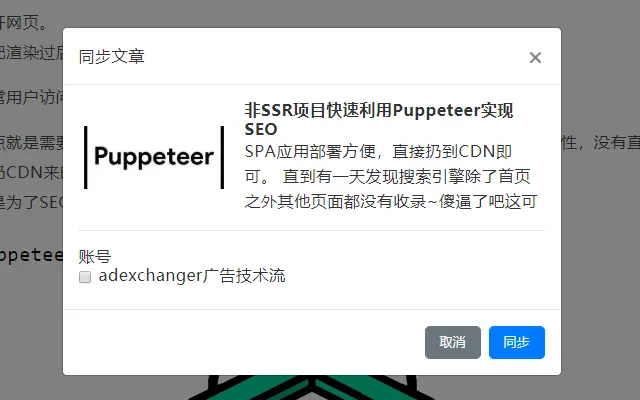

Sync Articles Across Platforms with One Click
Overview
The software is designed to streamline the content publishing workflow for creators and marketers who manage multiple online platforms. It enables users to publish a single article, originally written for a WeChat Official Account, across various platforms such as Zhihu, Jianshu, and WordPress without the need for repetitive reformatting or manual uploads. This addresses the common pain point of content duplication and formatting inconsistencies across channels. The tool is especially useful for professionals who maintain active blogs, social media profiles, or content-driven websites and require efficient cross-platform distribution.
Target users include content creators, digital marketers, bloggers, and social media managers who rely on consistent messaging and efficient publishing. The software operates locally, ensuring that user data and content remain private and secure. It supports automated synchronization based on user-defined rules and integrates with multiple publishing platforms. While the developer name was not provided, the focus on WeChat content and multi-channel publishing suggests a specialized tool built for Chinese digital content ecosystems.
Real-world use cases include a marketing team publishing a single blog post across WeChat, Zhihu, and a company WordPress site with identical formatting and image placement. It also benefits freelance writers who repurpose articles for different audiences. The software eliminates the need for copy-paste workflows, reducing errors and saving significant time during content distribution.
Key Features & Capabilities
- One-Click Multi-Platform Publishing – Create a single article in WeChat Official Account and publish it across supported platforms with minimal effort, maintaining consistent formatting and image placement.
- Local Data Storage – All user data and content are stored locally, ensuring privacy and reducing reliance on cloud-based services.
- Automatic Image Upload – Images from the original article are automatically uploaded to the target platforms, preserving visual integrity.
- Customizable WeChat Article Styling – Users can define and save formatting rules for WeChat articles, ensuring consistent presentation across posts.
- Flexible Synchronization Triggers – The synchronization process can be initiated via a right-click context menu, allowing users to choose when to publish.
- Support for Major Publishing Platforms – Compatible with Zhihu, Jianshu, WordPress, and other popular content platforms.
- Bug Fixes and Stability Improvements – Version 1.0.2 includes critical fixes for article extraction errors, synchronization issues, and platform-specific bugs like those in the Toutiao and WordPress integrations.
These features allow users to maintain a unified content strategy across platforms. For example, a blogger can draft a post on WeChat, use the tool to sync it to Zhihu and Jianshu, and have all images automatically uploaded without manual intervention. The right-click menu trigger ensures that users retain control over when synchronization occurs, preventing unintended publishing.
User Interface, Workflow & Performance
The user interface is designed to be minimal and integrated into the browser environment, likely operating as a desktop application with browser extension components. Navigation is straightforward, centered around the right-click context menu, which provides access to the synchronization function. The workflow is streamlined: after drafting an article in WeChat, users simply right-click on the page or article content to trigger the sync process.
Based on the described functionality, the software appears optimized for efficiency, reducing repetitive tasks. The integration with WeChat’s publishing environment suggests a tight workflow that minimizes context switching. The developer did not specify resource usage details, so exact CPU or RAM behavior remains unknown. Performance observations are based on general software behavior patterns for similar tools.
Stability has been improved in recent versions, particularly with fixes for synchronization errors and crashes during WordPress publishing. The tool appears to operate reliably during standard use cases, though real-world performance may vary depending on network speed and platform API availability. No reported issues with crashes or freezes were mentioned in the release notes.
Compatibility & System Requirements
The software is compatible with Windows, Mac, and Linux operating systems, making it accessible to a broad user base across different computing environments. It requires 120MB of disk space for installation, which is modest for a desktop application with cross-platform publishing capabilities.
Exact system requirements were not listed. The developer did not provide additional system requirements beyond the operating system support. Hardware specifications such as processor speed, RAM, or graphics support were not disclosed. Compatibility information is limited to the operating systems mentioned and the installation size.
Users should ensure their system meets general requirements for running desktop applications, including a stable internet connection for platform synchronization. The tool likely requires browser access and integration with the WeChat Official Account editor.
Pros and Cons
Pros
- Effortlessly syncs WeChat articles to multiple platforms with consistent formatting
- Images are automatically uploaded to target platforms, preserving visual quality
- Local data storage ensures privacy and security
- Right-click menu integration offers on-demand synchronization
- Regular updates with bug fixes and stability improvements
- Free to use with no licensing barriers
Cons
- Developer name not disclosed, limiting trust verification
- Exact system requirements not provided
- Limited to WeChat content as the source
- No information on update frequency or auto-update capability
- Platform support is not fully detailed beyond listed examples
FAQ Section
Is the software compatible with all major platforms?
The software supports synchronization with platforms like Zhihu, Jianshu, and WordPress. Specific compatibility with other platforms depends on the integration status and may vary.
Is my content stored securely?
Yes. All user data and content are stored locally on the device. The software does not transmit content to external servers unless required for platform synchronization.
How often are updates released?
Updates are released as needed, with recent versions addressing critical bugs and improving stability. The frequency of updates is not publicly specified.
Does the software require an internet connection?
Yes. An active internet connection is required to sync content to external platforms such as Zhihu, Jianshu, and WordPress.
Can I use this tool without a WeChat Official Account?
The software is designed to work with content created in WeChat Official Account. It may not function properly with other content sources or platforms.
Final Thoughts + CTA
For content creators and digital marketers managing multiple platforms, this tool offers a practical solution to reduce repetitive work and ensure consistent publishing. Its focus on WeChat content, combined with secure local storage and multi-platform support, makes it a valuable asset in a content-driven workflow. While some details like developer identity and system requirements are missing, the core functionality is solid and well-executed.
Users who frequently publish WeChat articles and want to expand their reach without reformatting are the ideal audience. The free pricing model removes financial barriers to adoption.
Download Sync Articles Across Platforms with One Click now.







